Share article:



Apple iOS 26 update: Everything you need to know about new inbox changes

Apple’s latest update, iOS 26, is changing how messages are displayed and classified on iPhones – and that could impact how your SMS and RCS campaigns reach customers.
Here’s a breakdown of what’s changing, why it matters for marketers and businesses, and how to make sure your messages still get noticed.
What’s Changing in iOS 26
Apple is introducing new inbox rules that determine how messages are organised inside the Messages app.
A new “Unknown Senders” inbox
With iOS 26, messages from numbers not saved in a user’s contacts can automatically go to an “Unknown Senders” folder.
Messages that land here:
- Won’t trigger sounds, vibrations, or lock-screen notifications
- Will appear in a separate tab instead of the main inbox
- May still show a small unread badge, but without alerts
While this feature isn’t always enabled by default, Apple is expected to roll it out more broadly across regions.
How Apple classifies a “Known” vs “Unknown” sender
Apple’s filtering logic looks at several factors when deciding where a message should go. A sender is considered “known” if:
- The number is saved in the user’s contacts
- The user has started the conversation
- The user has replied several times to previous messages (3-message rule)
- The user manually marks the sender as known
If none of these apply, your messages could be treated as coming from an unknown sender — even if you have full opt-in consent and send legitimate business messages.
Time-sensitive messages are an exception
Messages that Apple detects as time-sensitive, like appointment reminders, one-time passwords (OTPs), delivery notifications, or emergency alerts can temporarily bypass the “Unknown Senders” folder.
These messages may appear in the main inbox for a limited time (usually between one and eight hours) before being moved if the sender remains “unknown”.
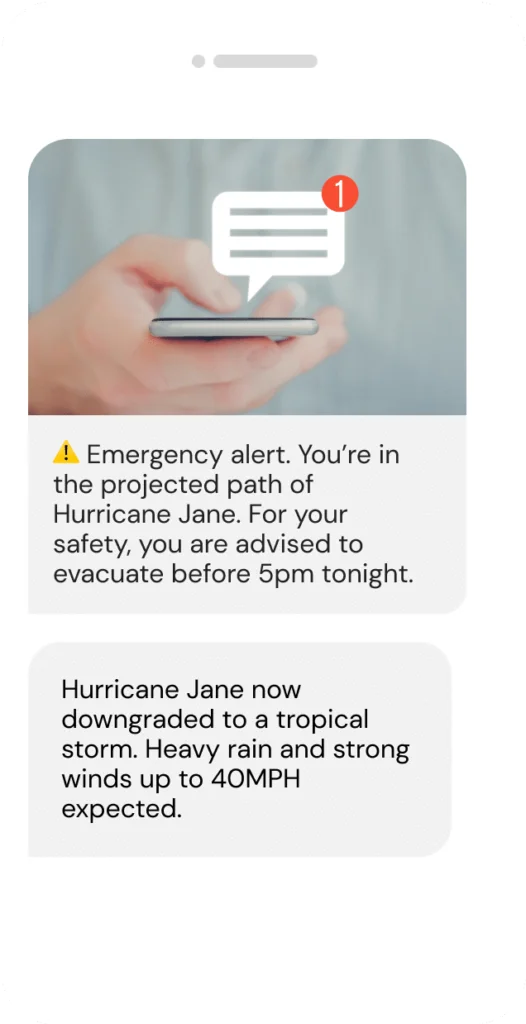
That means urgent service alerts (like this example above) may still reach customers promptly, but promotional or informational campaigns might not.
Apple’s RCS Support
With iOS 26, Apple is also rolling out RCS (Rich Communication Services) support, enabling richer, more interactive messaging between iPhones and Android devices.
However, it’s important to note:
- RCS messages don’t automatically bypass the new filtering logic.
- Even branded or verified RCS business messages must still meet the “known sender” criteria to appear in the main inbox.
- RCS for Business is not available globally on iOS, only in certain countries, including the US & UK.
RCS enhances customer experience but doesn’t replace the need for smart message strategy.
Why this matters for business text messaging
If you rely on SMS or RCS to connect with your customers, iOS 26 could impact engagement and visibility if you don’t adapt to these new changes.
Potential impact:
- Reduced visibility: Your messages might skip the main inbox if customers haven’t saved your number.
- Lower engagement: Fewer notifications mean fewer eyes on your content.
- Opt-in challenges: Flows where the business sends the first message may trigger the “unknown” classification.
As always, it’s about making sure your messages reach the right place and that your customer recognise and trust your brand.
How to prepare your SMS strategy
Here are five practical steps to help your business stay ahead of iOS 26:
1. Review your opt-in flows
If your campaign sends the first message (“Reply YES to subscribe”), your number may be treated as unknown.
Encourage customers to text you first, or follow up quickly to confirm and engage.
2. Encourage early engagement
Ask subscribers to reply, save your number, or confirm receipt early on. Two-way communication helps classify your number as known.
3. Optimise your Welcome messages
Add a friendly reminder like:
“Save us as a contact to keep getting our updates in your main inbox!”
4. Tag or segment time-sensitive messages
Use your messaging platform’s settings to flag one-time passwords (OTPs) or time-critical alerts — these have a better chance of surfacing in the main inbox.
5. Monitor performance post-update
After iOS 26 rolls out, monitor changes in delivery, open rates, and response rates. Compare performance for iPhone users to spot trends early.
What to watch for next
Apple may continue to refine how message filtering works — including regional defaults and how “known” senders are detected.
We’ll keep you updated as more data emerges.
Keep your texts visible and maximize ROI with MessageMedia
Apple’s iOS 26 update represents a significant shift in how SMS and RCS are handled on iPhones. For teams that engage their audience with text messages, it’s a reminder that deliverability is more than just sending messages – it’s about maintaining trusted, recognised connections with your audience.
Make sure your business can adapt to these iOS changes and consistently get the most out of your mobile messaging campaigns with Sinch MessageMedia. Start your free 14-day trial now.